What AI Tools Do People Actually Use Every Day? (Real Workflows Explained)

There is a quiet mismatch between how AI tools are marketed and how they are actually used. If you read product pages, you might think people are running fully automated businesses powered by a dozen AI systems talking to each other. In reality, most people who rely on AI daily are doing something much simpler—and much more practical.
They are not building “AI-first companies.” They are building AI-assisted habits.
The difference matters. Because if you are trying to figure out what tools are worth your time, you don’t need a list of everything that exists. You need to understand what real workflows look like—what people actually open, how often, and why those tools stick.
The Reality: Most People Use 3–5 AI Tools, Not 20
Despite the explosion of AI products, daily usage tends to converge around a small core stack. Across different professions—writers, analysts, developers, marketers—you’ll notice a similar pattern:
- One general-purpose AI assistant
- One writing or documentation tool
- One automation or integration layer (optional)
- One specialized tool depending on the job
For example, a typical stack might look like:
- ChatGPT or Claude for thinking and drafting
- Notion for organizing work
- Grammarly for polishing
- Zapier for connecting tools
That’s it. Not because people lack awareness, but because complexity has a cost. Every additional tool introduces friction: switching contexts, managing outputs, and debugging inconsistencies.
The people who actually benefit from AI are usually the ones who limit their stack.
Workflow 1: The “Thinking Partner” Loop (Used by Knowledge Workers Daily)
This is the most common and most misunderstood use case.
AI is not replacing thinking. It is restructuring it.
What it looks like in practice:
1. Start with a vague idea or problem
2. Open ChatGPT or Claude
3. Ask for structure, options, or clarification
4. Push back on the response
5. Refine your thinking through iteration
6. Export the result into your working document
This loop can happen dozens of times per day, often in short bursts of 3–10 minutes.
Why this works:
The real value is not the output—it’s the cognitive friction reduction. Instead of staring at a blank page or getting stuck in your own assumptions, you externalize your thinking process.
What most people get wrong:
They expect a perfect answer on the first try. That’s not how this workflow works. The value emerges from interaction, not one-shot prompts.
How to apply it:
- Use AI to challenge your assumptions, not just confirm them
- Ask for multiple perspectives, especially opposing ones
- Treat responses as draft thinking, not final truth
If you only change one habit after reading this article, make it this one.
Workflow 2: Draft → Refine → Personalize (Content Creation Without Losing Voice)
Many people assume AI-generated content is generic because they stop too early in the process.
The real workflow looks like this:
Step 1: Draft
Use ChatGPT or similar tools to generate a rough structure or first draft.
Step 2: Refine
Edit for clarity, logic, and flow. This is where tools like Grammarly or built-in editors help.
Step 3: Personalize
This is the step most people skip—and why their content feels generic.
You add:
- Personal experience
- Specific examples
- Context that AI cannot infer
Why this matters:
AI is very good at producing acceptable content. But “acceptable” is not memorable, not persuasive, and not differentiated.
The competitive advantage comes from how you modify the output.
Practical tip:
Instead of asking AI to “write better,” ask it to:
- Simplify complex sections
- Expand weak arguments
- Suggest alternative structures
Then do the final shaping yourself.
Workflow 3: The “Second Brain” System (AI + Notes Integration)
People don’t just use AI to generate content. They use it to manage information overload.
A common setup involves:
- Notion or Obsidian for storing notes
- AI tools for summarizing and connecting ideas
Real-world usage:
- Summarizing articles or reports
- Turning messy notes into structured outlines
- Extracting key insights from long documents
The key shift:
Instead of storing raw information, people store processed insights.
AI acts as a pre-processor.
What makes this effective:
Over time, your notes become:
- Easier to search
- Easier to reuse
- More aligned with your actual thinking
How to implement:
After consuming any content (article, meeting, video):
1. Paste it into your AI tool
2. Ask for:
- Key takeaways
- Contradictions or gaps
- Actionable insights
3. Store the refined version in your note system
This creates a compounding effect. Your knowledge base becomes more valuable over time.
Workflow 4: Micro-Automation (Small Wins, Not Full Automation)
There is a lot of talk about “AI automation,” but most daily usage is not fully automated workflows. It’s small, targeted improvements.
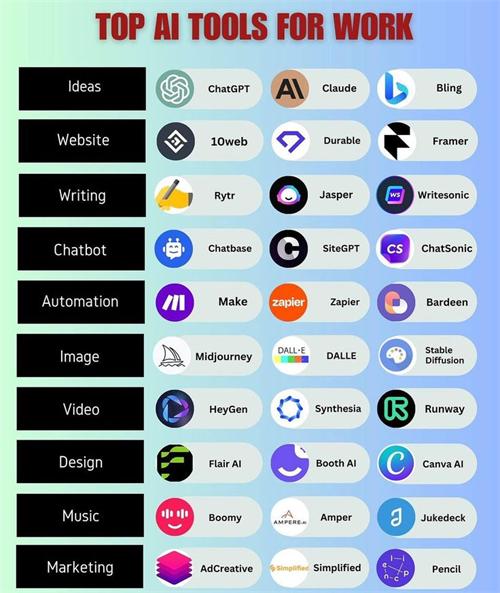
Tools like Zapier or Make are used for:
- Moving data between tools
- Triggering simple actions
- Reducing repetitive manual steps
Example:
- New email → summarized by AI → saved to notes
- Form submission → categorized → added to spreadsheet
Why this works:
Instead of trying to automate everything, people automate friction points.
Common mistake:
Overbuilding automation systems that are:
- Hard to maintain
- Fragile when something changes
- More work than manual processes
Practical advice:
Start with tasks you repeat at least 3–5 times per week. If it’s not frequent, it’s not worth automating.
Workflow 5: Coding and Problem Solving (Even for Non-Developers)
AI-assisted coding is not just for engineers.
Tools like GitHub Copilot or general AI assistants are used for:
- Writing small scripts
- Debugging errors
- Understanding unfamiliar code
- Automating personal tasks
What’s interesting:
Many users are not “developers.” They are:
- Analysts
- Marketers
- Small business owners
They use AI to bridge skill gaps.
Example:
A non-technical user might:
- Ask AI to write a script to clean data
- Run it with minimal modification
- Iterate based on results
Why this matters:
AI lowers the barrier to entry for technical tasks—but it doesn’t eliminate the need for understanding.
The most effective users:
- Test outputs
- Learn incrementally
- Build intuition over time
The Pattern Behind All These Workflows
If you step back, a pattern emerges.
People are not using AI to replace entire jobs. They are using it to:
- Reduce starting friction
- Improve iteration speed
- Handle low-value cognitive load
This is why simple tools dominate daily usage. They fit naturally into existing workflows.
What You Should Actually Do (Actionable Framework)
Instead of trying to adopt everything at once, start with this framework:
1. Identify Your Friction Points
Ask yourself:
- Where do I get stuck most often?
- What tasks feel repetitive or slow?
2. Map One Tool to One Problem
Examples:
- Stuck on writing → use AI for outlining
- Overwhelmed with information → use AI for summarization
- Repetitive tasks → use automation tools
3. Build a Simple Loop
Your workflow should look like:
Input → AI → Human refinement → Output
If it becomes more complicated than that, simplify.
4. Track What Actually Saves Time
Not everything will. Some tools add overhead.
Keep what works. Drop what doesn’t.
A Final Thought: The Tools Matter Less Than the Habits
It’s tempting to focus on which AI tools are “best,” but that’s the wrong question.
The more useful question is:
What workflows make these tools consistently valuable?
Because tools will change. New platforms will appear, old ones will fade. But the underlying patterns—thinking loops, refinement cycles, information processing—will remain.
People who benefit from AI long-term are not the ones chasing every new release. They are the ones who quietly build reliable systems around a few tools and use them every day.
If you can do that, you won’t just “use AI.” You’ll actually work better because of it.
Recommend for you:

AI Video Tools vs Manual Editing: Where Is the Real Time Saving?
Why AI Feels Faster Than It Often Is
Should You Centralize Everything in One AI Tool or Split Tools?
The Illusion of the “All-in-One” AI
What AI Tools Do People Actually Use Every Day? (Real Workflows Explained)
They are not building “AI-first companies.” They are building AI-assisted habits.
Should You Let AI Handle Your Communication (Emails, Replies, Proposals)?
Why spend 20 minutes polishing an email when an AI can generate one in 10 seconds?