
AI Video Tools vs Manual Editing: Where Is the Real Time Saving?
I’ve spent the past seven years moving between two worlds that don’t always like each other: fast-turnaround digital content production and slower, craft-driven video editing. By day, I worked with small media teams producing educational and documentary-style content. By night, I freelanced—sometimes editing wedding films frame by frame, sometimes helping YouTubers batch-produce content under brutal deadlines.
Somewhere around 2022, everything changed. AI video tools started creeping into workflows—not as gimmicks, but as real operators. At first, I resisted them. Then I tested them. Eventually, I depended on them… selectively.
The Illusion of Speed: Why AI Feels Faster Than It Often Is
When people first use AI video tools, the experience is almost intoxicating. You paste a script, click a few buttons, and suddenly there’s a video: stock footage, captions, transitions, even background music.
Compared to opening a timeline in traditional editing software, this feels like teleportation.
But that feeling hides a deeper issue: output speed is not the same as production speed.
A creator I worked with—let’s call him Daniel—ran a mid-sized educational channel. He switched to AI tools expecting to cut his production time in half. His first few videos were indeed faster. But within two weeks, he was spending more time per video than before.
Why?
Because AI shifted his work from editing to correcting.
Instead of carefully building a timeline once, he was now:
- Replacing irrelevant stock clips
- Fixing awkward sentence pacing in auto-generated voiceovers
- Adjusting subtitles that didn’t quite match tone or timing
- Re-exporting multiple times because small issues kept surfacing
The process became fragmented. Each fix seemed small, but together they erased the initial time savings.
Manual Editing: Slow Start, Predictable Finish
Manual editing has a reputation for being time-consuming—and it is. There’s no shortcut to scrubbing through footage, trimming clips, syncing audio, and fine-tuning transitions.
But here’s the part people underestimate: manual workflows are linear and predictable.
Once you’ve structured your project:
1. Rough cut
2. Fine cut
3. Color/audio polish
4. Export
Each stage builds on the previous one. Mistakes are caught early. Decisions are intentional.
A wedding videographer I collaborated with once told me something that stuck:
“Manual editing feels slow on day one, but it doesn’t surprise you on day three.”
That’s a profound advantage. Time isn’t just about speed—it’s about control over where the time goes.
Where AI Actually Saves Time (And It’s Not Where You Think)
After working with both approaches extensively, I’ve found that AI tools deliver real time savings, but only in specific stages of the workflow.
1. Pre-Production and Ideation
This is where AI shines.
Generating outlines, scripting drafts, shot lists, even rough storyboards—these tasks used to take hours of staring at a blank page. Now they can be accelerated dramatically.
In one project, we reduced planning time from 6 hours to under 2 by using AI-assisted scripting. The key wasn’t accepting the output blindly, but using it as a thinking partner.
Time saved here is genuine, because:
- There’s little cost to iteration
- Mistakes are low-risk
- Creativity benefits from volume
2. Rough Assembly (First Draft Videos)
AI is also highly effective at producing first-pass drafts.
For example:
- Auto-generating subtitle tracks
- Matching stock footage to keywords
- Creating basic scene sequences
This is especially useful for:
- Social media content
- Internal presentations
- Low-stakes marketing videos
However, this only works if you treat the AI output as a draft, not a finished product.
3. Repetitive Tasks
This is the most underrated advantage.
AI tools are excellent at:
- Silence removal in long recordings
- Background noise reduction
- Auto-captioning
- Resizing videos for multiple platforms
These tasks are tedious but necessary. Automating them doesn’t just save time—it preserves mental energy.
Where AI Loses Time (And Quietly Kills Efficiency)
Here’s where things get uncomfortable.
AI tools often introduce hidden inefficiencies that aren’t obvious at first.
1. Precision Editing
If your video requires:
- Emotional pacing
- Narrative tension
- Exact comedic timing
AI will struggle.
And fixing AI mistakes in these areas often takes longer than doing it manually from scratch.
A Reddit user in a video editing thread described their experience:
“I spent 20 minutes generating a video and 2 hours fixing what felt ‘off.’ I could have edited it manually in 90 minutes.”
That’s not an isolated case—it’s a pattern.
2. Creative Decision-Making
AI can generate options, but it doesn’t understand intent.
When you’re editing manually, every cut answers a question:
- What should the viewer feel here?
- What should they notice?
- What should they remember?
AI outputs often feel generic because they optimize for “average correctness,” not specific impact.
And when something feels “almost right,” humans spend disproportionate time tweaking it.
3. Iteration Loops
Manual editing tends to follow a clear progression.
AI workflows, on the other hand, can become cyclical:
- Generate → review → adjust input → regenerate → repeat
Each cycle feels small, but they accumulate quickly.
This is what I call the “iteration trap.” It gives the illusion of progress while consuming time in unpredictable bursts.
A More Honest Comparison: Time Is Not One Thing
To understand where time is saved, we need to break it down:
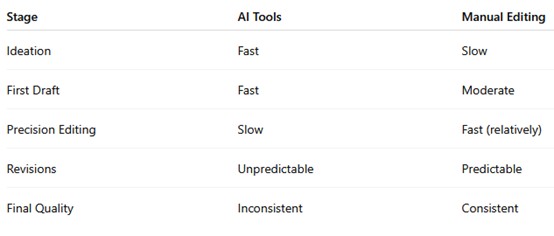
The takeaway is simple but often ignored:
AI compresses the beginning of the process. Manual editing stabilizes the end.
A Hybrid Workflow That Actually Saves Time
After years of trial and error, I’ve settled into a workflow that consistently delivers both speed and quality.
It’s not fully AI-driven, and it’s not purely manual.
It’s structured like this:
Step 1: AI-Assisted Planning (20–30% time saved)
- Generate script drafts
- Create rough structure
- Identify key scenes
Step 2: AI Rough Cut (Optional)
- Use AI to assemble a basic version
- Only if the content is straightforward
Step 3: Manual Editing Core (Critical Stage)
- Rebuild or refine timeline manually
- Focus on pacing, storytelling, emotion
Step 4: AI for Cleanup
- Auto captions
- Noise reduction
- Format adjustments
Step 5: Final Human Pass
- Watch as a viewer, not an editor
- Fix anything that feels “off,” not just technically wrong
This hybrid approach avoids the biggest trap: over-relying on AI where it performs worst.
A Real Case: Cutting a 10-Minute Educational Video
Let me give you a concrete comparison from a project we tracked internally.
Manual Workflow:
- Planning: 4 hours
- Editing: 6 hours
- Revisions: 2 hours
- Total: 12 hours
AI-Heavy Workflow:
- Planning: 1.5 hours
- AI generation: 0.5 hours
- Fixing issues: 8 hours
- Revisions: 3 hours
- Total: 13 hours
Hybrid Workflow:
- Planning (AI-assisted): 2 hours
- Rough cut (AI): 1 hour
- Manual refinement: 5 hours
- Cleanup (AI): 1 hour
- Revisions: 2 hours
- Total: 11 hours
The hybrid model didn’t just save time—it reduced frustration.
And that matters more than most people admit.
The Psychological Factor: Energy vs Time
There’s another layer to this discussion that rarely gets addressed.
AI tools don’t just affect time—they affect mental fatigue.
Manual editing is demanding but immersive. Many editors enter a flow state.
AI-assisted workflows, by contrast, often involve:
- Frequent context switching
- Evaluating imperfect outputs
- Making micro-corrections
This can be mentally draining, even if the clock says you’re “faster.”
So the real question becomes:
Are you optimizing for speed, or for sustainable productivity?
Practical Guidelines: How to Decide What to Use
If you want a clear, actionable framework, use this:
Use AI Tools When:
- You need volume over perfection
- The content is informational, not emotional
- Tasks are repetitive or mechanical
- You’re in early-stage ideation
Use Manual Editing When:
- Storytelling matters
- Timing is critical
- Brand voice must be precise
- You want consistent quality
Use Both When:
- You care about both speed and quality
- You’re producing content regularly
- You want to scale without losing control
Final Thought: The Real Time Saving Is Strategic, Not Technical
People often ask, “Which is faster: AI or manual editing?”
That question misses the point.
The real advantage doesn’t come from choosing one over the other. It comes from understanding where each one belongs.
AI is not a replacement for editing. It’s a redistribution of effort.
Manual editing is not outdated. It’s where meaning is shaped.
If you use AI to skip thinking, you will lose time fixing mistakes.
If you use manual editing for everything, you will waste time on tasks machines can handle.
But if you divide the work intelligently, something interesting happens:
You don’t just save time—you gain control over it.
And in video production, control is often worth more than speed.
Recommend for you:
AI Strategy for Career Switchers Entering Tech Fields
A growing number of professionals are switching into tech from completely unrelated backgrounds—healthcare, education, logistics, finance, even the arts.
How to Detect Redundant Tools in Your Stack
Redundancy in a tool stack is rarely obvious at first. It does not show up as a single broken system or a clear failure. It appears quietly through duplicated functionality, scattered data, inconsistent workflows, and subtle cognitive friction.
Should You Use AI First or Google First in Research Workflows?
A few years ago, my research workflow was simple: open Google, skim the first five results, maybe click into a Reddit thread if I felt stuck, and then slowly piece together an answer.
Why AI Doesn’t Really Understand Your Work (And What That Means)
It has practical consequences for how you should use AI, how much you should trust it, and where it can quietly lead you astray.