
AI Coding Assistants vs Stack Overflow: What’s More Efficient?

A few years ago, when I was still working as a backend developer in a mid-sized logistics company, my workflow looked very different from what it is today. Back then, most of my problem-solving loop revolved around searching, reading, filtering, and adapting answers from forums—especially Stack Overflow. Today, like many developers, I often start by asking an AI coding assistant.
At first glance, this feels like a simple upgrade: faster answers, less searching, fewer tabs. But after watching how junior developers on my team now rely almost entirely on AI—and occasionally get stuck in ways I didn’t expect—I’ve realized something important:
This is not just a tool replacement. It’s a shift in how developers think, learn, and debug.
So the real question isn’t “Which is better?” It’s: In what situations is each actually more efficient—and what are you trading off when you choose one over the other?
The Old Workflow: Why Stack Overflow Worked So Well
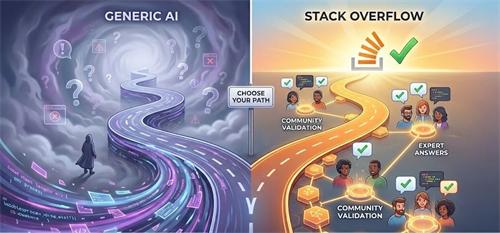
Before AI assistants became mainstream, developers relied heavily on community-driven knowledge. Platforms like Stack Overflow weren’t just Q&A sites—they were curated layers of collective debugging experience.
What made them efficient wasn’t speed, but signal quality.
When I searched for an issue like:
“Python JSON decode error unexpected character”
I wouldn’t just get one answer. I’d see:
- Multiple interpretations of the problem
- Edge cases discussed in comments
- Corrections to incorrect answers
- Real-world examples from different environments
This created something subtle but powerful: contextual learning through comparison.
A highly upvoted answer wasn’t just a solution—it was a validated solution, stress-tested by hundreds or thousands of developers.
However, this came with a cost:
- Time spent refining search queries
- Cognitive load from scanning multiple answers
- Risk of outdated or irrelevant solutions
In other words, Stack Overflow optimized for accuracy through friction.
The New Workflow: Why AI Feels Faster
AI coding assistants remove most of that friction.
You describe the problem once, and you get:
- A direct answer
- Code tailored to your context (or at least it appears so)
- Explanations in plain language
- Follow-up iterations without leaving your editor
From a purely time-based perspective, this is hard to beat.
I’ve personally cut debugging time in half for routine issues. Tasks that used to take 20 minutes of searching now often take 3–5 minutes.
But here’s where things get complicated.
Efficiency Is Not Just Speed
One of the most common mistakes I see—especially among less experienced developers—is equating speed of output with efficiency of understanding.
AI assistants are excellent at producing answers. They are less reliable at ensuring you understand why the answer works.
A junior developer I mentored recently ran into a subtle concurrency issue in a Node.js service. He used an AI assistant, got a working fix involving async locking, and moved on.
A week later, the same pattern caused a production bug.
When I asked him why the fix worked, he paused and said:
“I’m not completely sure—I just used what the AI suggested.”
This is where Stack Overflow still has an advantage.
The Hidden Strength of Stack Overflow: Friction as a Feature
When you read through multiple answers, conflicting opinions, and long comment threads, something happens:
You’re forced to think.
You evaluate trade-offs.
You compare solutions.
You notice edge cases.
That friction slows you down—but it also builds mental models.
There’s an old discussion thread on Stack Overflow about handling floating-point precision errors in JavaScript. The top answer explains the issue, but the comments go further—debating rounding strategies, performance implications, and financial application risks.
That entire thread is more than an answer. It’s a mini-education.
AI rarely recreates that depth unless you explicitly ask for it—and even then, it often compresses complexity into something deceptively simple.
Where AI Coding Assistants Are Truly More Efficient
After using both extensively, I’ve found that AI assistants clearly outperform Stack Overflow in specific scenarios:
1. Well-Defined, Repetitive Problems
If the issue is common and clearly scoped—like syntax errors, API usage, or simple transformations—AI is significantly faster.
Example:
- Converting data formats
- Writing boilerplate code
- Explaining error messages
In these cases, the overhead of searching and filtering on Stack Overflow is unnecessary.
2. Context-Aware Iteration
AI shines when the problem evolves.
Instead of opening multiple tabs, you can refine your question:
- “Now optimize this for memory usage”
- “Rewrite this for async execution”
- “Explain why this fails on large datasets”
This iterative loop is something Stack Overflow simply cannot match.
3. Bridging Knowledge Gaps Quickly
AI is particularly useful when you’re working slightly outside your expertise.
For example, when I had to write a quick script in Go (a language I don’t use daily), AI helped me get a working solution in minutes. Stack Overflow would have required more context-building.
Where Stack Overflow Still Wins
Despite the rise of AI, there are areas where Stack Overflow remains more efficient—especially in the long run.
1. Ambiguous or Poorly Understood Problems
If you don’t fully understand the problem, AI can confidently give you the wrong direction.
Stack Overflow, on the other hand, exposes ambiguity through:
- Multiple interpretations
- Clarifying comments
- Alternative approaches
This helps you refine the problem itself, not just the solution.
2. Edge Cases and Production-Level Issues
AI tends to generalize. Stack Overflow captures exceptions.
Real-world example from a Reddit programming thread:
> A developer followed an AI-generated solution for database indexing. It worked in testing but caused severe performance degradation in production due to a specific query pattern not considered by the AI.
On Stack Overflow, similar issues often include detailed discussions about when a solution should not be used.
3. Trust Through Transparency
With Stack Overflow, you can see:
- Who answered
- How many people agreed
- What criticisms exist
AI outputs don’t provide this transparency. Even when correct, they lack visible validation.
A More Realistic Model: It’s Not Either-Or
The most efficient developers I’ve worked with don’t choose between AI and Stack Overflow.
They combine them strategically.
Here’s a practical workflow that has worked well for me and my team:
A Practical Hybrid Workflow You Can Use
Step 1: Start with AI for Speed
Use an AI assistant to:
- Get an initial solution
- Understand basic concepts
- Generate a starting point
This minimizes time-to-first-attempt.
Step 2: Validate with Community Knowledge
Before finalizing, cross-check:
- Search for similar issues on Stack Overflow
- Look for edge cases or warnings
- Compare alternative approaches
This step prevents silent failures.
Step 3: Stress-Test the Solution
Ask:
- What happens under load?
- What are the failure modes?
- Are there known limitations?
AI can help here, but community discussions often reveal deeper insights.
Step 4: Internalize the Pattern
Don’t just copy the solution.
Rewrite it.
Explain it to yourself or a teammate.
Apply it in a slightly different context.
This is where real efficiency is built—because you won’t need to look it up next time.
The Real Trade-Off: Convenience vs Cognitive Depth
If I had to summarize the difference in one sentence:
- AI optimizes for immediate output
- Stack Overflow optimizes for durable understanding
Neither is inherently better. But over-reliance on one creates blind spots.
I’ve seen developers become incredibly fast with AI—but struggle when debugging novel issues without it.
I’ve also seen developers who rely only on traditional forums—accurate but slow, often overwhelmed by information.
A Final Thought Most People Overlook
Efficiency isn’t just about solving today’s problem.
It’s about reducing the number of problems you’ll struggle with tomorrow.
AI can make you faster today.
Stack Overflow can make you sharper over time.
The developers who will have the biggest advantage in the next few years are not the ones who pick one over the other—but the ones who understand when to think, and when to delegate thinking to a tool.
And that distinction, more than any specific technology, is what separates someone who writes code from someone who truly understands it.
Recommend for you:
Should You Centralize Everything in One AI Tool or Split Tools?
The Illusion of the “All-in-One” AI
Should You Use AI First or Google First in Research Workflows?
A few years ago, my research workflow was simple: open Google, skim the first five results, maybe click into a Reddit thread if I felt stuck, and then slowly piece together an answer.
When AI Corrections Introduce More Errors
The promise is simple: reduce human error by letting machines detect and correct mistakes automatically.
What AI Tools Do People Actually Use Every Day? (Real Workflows Explained)
They are not building “AI-first companies.” They are building AI-assisted habits.