
Building a Minimal AI Tool Stack That Actually Works

In the current AI landscape, most people do not suffer from a lack of tools. They suffer from too many of them. New apps appear every week, each promising to automate writing, summarize research, generate content, manage workflows, or replace entire skill sets. Yet paradoxically, the more tools people adopt, the more fragmented their workflow becomes. Instead of saving time, they spend it switching contexts, reformatting outputs, and trying to remember which tool does what.
A minimal AI tool stack is not about using fewer tools for the sake of simplicity. It is about deliberately designing a system where every tool has a defined role, overlaps are eliminated, and cognitive load is reduced. A good stack does not feel like a collection of apps. It feels like a workflow that quietly supports thinking, creating, and executing.
1. The Core Problem: Tool Accumulation Without System Design
Most AI users build their stack in reverse order. They start with tools instead of workflows.
A typical pattern looks like this:
- Try a writing AI for blog posts
- Add a summarization tool for research
- Add a prompt library app
- Add a meeting transcription tool
- Add a separate chatbot for coding
- Add another AI for image generation
Individually, each tool seems useful. But collectively, they create friction:
- You don’t know where to start a task
- Outputs are scattered across platforms
- You re-explain context repeatedly
- You spend more time organizing than producing
The hidden cost is not money. It is decision fatigue. Every task becomes a question: Which tool should I use for this?
A minimal AI tool stack solves this by shifting the focus from “best tools” to “clear roles.”
2. The Principle of a Minimal AI Stack
A working AI stack is built on three principles:
Principle 1: One Primary Tool Per Cognitive Function
Instead of multiple overlapping tools, assign one main tool per category of work:
- Thinking & reasoning (general AI assistant)
- Writing & editing
- Information capture (notes, transcription, storage)
- Execution (automation or coding assistance if needed)
The goal is not perfection. The goal is decision elimination.
Principle 2: Output Flow Matters More Than Tool Features
A powerful tool is useless if its output cannot flow into the next step of your work. A minimal stack prioritizes:
- Copy-paste friendliness
- Exportability
- Compatibility across systems
- Low friction transitions between tasks
If a tool produces excellent output but traps it inside its own ecosystem, it adds hidden complexity.
Principle 3: Reduce Context Switching, Not Tool Count
Many people obsess over having “fewer tools,” but what actually matters is reducing mental switching cost.
A minimal stack might still have 4–6 tools. The difference is that each one has a clearly defined job, so your brain never has to re-decide its purpose.
3. The Structure of a Minimal AI Tool Stack
A practical minimal AI stack can be broken into four layers. This structure is not tied to any specific brand or product, but rather to function.
Layer 1: The Cognitive Core (General AI Assistant)
This is your thinking partner. It handles:
- Ideation
- Drafting
- Problem-solving
- Explanation of complex topics
- First-pass analysis
Its job is not to finish work but to accelerate thinking. The mistake many users make is treating this layer as the entire system. In reality, it is only the entry point.
A good rule: if a task requires reasoning, start here first.
Layer 2: The Knowledge Memory Layer (Notes + Capture System)
AI becomes significantly more powerful when paired with structured memory.
This layer handles:
- Saving insights
- Organizing research
- Storing outputs from AI conversations
- Building a personal knowledge base
Without this layer, AI usage becomes “stateless.” You constantly rediscover the same ideas and lose continuity.
The key requirement is not complexity, but searchability. If you cannot retrieve an idea in seconds, the system fails.
A minimal setup usually involves:
- One note system
- Simple tagging or folder structure
- Regular consolidation (weekly or monthly)
Layer 3: The Production Layer (Writing / Content / Output Tools)
This layer turns thinking into deliverables.
It includes:
- Writing documents
- Creating reports
- Producing articles, scripts, emails
- Refining AI-generated drafts
The critical principle here is separation of drafting and polishing. Many people try to do both in one AI step, which leads to generic output.
A more effective workflow is:
1. AI generates raw structure
2. Human refines logic and tone
3. Final pass for clarity and coherence
This layer should feel like an editing desk, not a creation engine.
Layer 4: The Execution Layer (Automation and Integration)
This is the most optional but increasingly important layer.
It includes:
- Automating repetitive tasks
- Connecting tools together
- Simple scripting or workflow automation
- API-based actions if needed
For many users, this layer can remain minimal or even absent. But when used correctly, it eliminates repetitive friction such as:
- Copying data between apps
- Formatting repetitive outputs
- Rewriting similar content repeatedly
The key is restraint. Automation should only be added when a task is repeated frequently enough to justify it.
4. A Realistic Minimal Stack Example (Without Overengineering)
To make this concrete, here is what a minimal but functional AI stack might look like for a typical knowledge worker:
- One general AI assistant for reasoning and drafting
- One note system for long-term knowledge storage
- One writing environment for polished output
- Optional automation tool for repetitive tasks
That is it.
No need for five writing tools, three summarizers, and multiple “AI productivity dashboards.”
The power comes not from variety but from consistency.
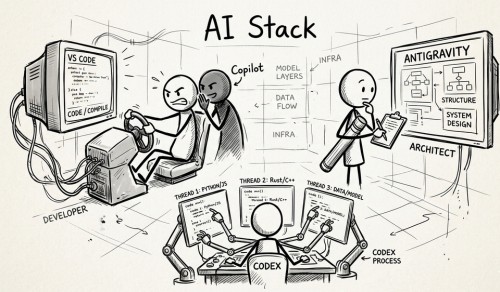
5. Workflow Design: How the Stack Actually Works in Practice
Step 1: Capture
An idea appears during reading or conversation. It is quickly stored in the note system without formatting pressure. The goal is speed, not structure.
Step 2: Expand with AI
The idea is pasted into the AI assistant with a prompt like:
“Expand this into structured arguments and identify potential applications.”
At this stage, you are exploring possibilities, not finalizing output.
Step 3: Store or Refine
Useful insights are saved back into the knowledge system. Weak or irrelevant output is discarded. This prevents clutter accumulation.
Step 4: Produce
When needed, selected insights are moved into the writing layer and shaped into a final output such as an article, report, or script.
Step 5: Automate (if repetitive)
If a pattern emerges—such as recurring content formats or reporting tasks—it is moved into the automation layer.
This workflow creates a loop between thinking, storing, and producing, without fragmentation.
6. Common Mistakes That Break Minimal AI Systems
Even with a good structure, most people still fail due to predictable mistakes:
Mistake 1: Tool Switching for Novelty
People abandon working tools because a new one feels “faster.” In reality, switching resets all efficiency gains.
Mistake 2: Over-automation Too Early
Automating unstable workflows creates fragile systems that break frequently.
Mistake 3: No Knowledge Consolidation
Without periodic review, the note system becomes a graveyard of unused information.
Mistake 4: Using AI as an End Point
AI should be part of a flow, not the final destination. Treating it as the final step leads to shallow output.
7. The Real Goal: Reducing Cognitive Friction, Not Maximizing Efficiency
A minimal AI tool stack is not about doing more work faster. It is about reducing invisible friction:
- Fewer decisions per task
- Fewer places to search
- Fewer duplicated efforts
- Fewer “where did I put that?” moments
When designed correctly, the system fades into the background. You stop noticing tools and start noticing progress.
8. How to Build Your Own Minimal Stack (Practical Steps)
If you want to design your own system, start with this sequence:
1. List your actual workflows (not tools)
- writing
- researching
- planning
- communicating
2. Assign one primary tool per workflow
3. Remove or pause all overlapping tools for two weeks
4. Observe friction points, not feature gaps
5. Add only what solves a repeated problem
6. Review monthly, not daily
This approach forces clarity. Most unnecessary tools disappear naturally when they are not constantly available.
Recommend for you:

Should You Let AI Handle Your Communication (Emails, Replies, Proposals)?
Why spend 20 minutes polishing an email when an AI can generate one in 10 seconds?
Which AI Tools Should You Use Based on Your Skill Level? (Beginner to Advanced)

When AI Over-Automation Creates More Work Instead of Less
The point at which automation stops being leverage and starts becoming overhead.
How to Detect Redundant Tools in Your Stack
Redundancy in a tool stack is rarely obvious at first. It does not show up as a single broken system or a clear failure. It appears quietly through duplicated functionality, scattered data, inconsistent workflows, and subtle cognitive friction.