
Are Paid AI Tools Worth It or Are Free Tools Enough?

There’s a quiet tension in how people talk about AI tools today. On one side, there’s the belief that everything meaningful sits behind a paywall—better models, faster outputs, smarter features. On the other, there’s a growing group of users who feel that free tools already do “good enough” work, especially for everyday tasks.
Both sides are right, and both sides are missing something important.
The real question is not whether paid AI tools are “worth it” in general. It’s whether they are worth it for the way you work, the decisions you make, and the risks you carry. Once you shift the conversation from tools to workflows, the answer becomes clearer—and often surprising.
The Illusion of “Better Output”
Most people assume paid AI tools produce significantly better results. Sometimes they do. But in many real-world use cases, the difference is not as dramatic as marketing suggests.
If you ask a free AI tool and a paid one to:
- summarize an article
- generate a simple email
- brainstorm blog ideas
you’ll often get outputs that are 80–90% similar in usefulness.
That last 10–20%—the part that feels more refined, more precise, more “human”—is what you’re paying for. But here’s the catch: that margin only matters if your work depends on it.
For someone writing internal notes or casual content, that extra polish might not translate into real value. But for someone publishing content at scale, writing client-facing material, or making decisions based on AI-generated insights, that margin can compound quickly.
So the first practical insight is this:
Paid tools rarely change what you can do. They change how reliably and efficiently you can do it.
Where Free Tools Are Surprisingly Enough
Free AI tools are often underestimated because people evaluate them based on edge cases rather than everyday use.
In reality, free tools are already sufficient for:
1. Exploration and Learning
If you’re still figuring out how AI fits into your workflow, paying early is often a mistake. Free tools allow you to:
- test prompts
- understand limitations
- experiment without pressure
This phase is not about optimization. It’s about discovery.
2. Low-Stakes Output
If the output doesn’t carry risk—no financial consequences, no reputational exposure—free tools are usually enough.
Examples:
- drafting personal notes
- outlining ideas
- casual translations
- basic research summaries
Even if the output is imperfect, the cost of being wrong is low.
3. Human-in-the-Loop Workflows
If you already review, edit, and refine everything manually, the AI tool is just a starting point. In this case, the difference between free and paid becomes less critical.
A skilled user can often compensate for weaker AI output through better prompts and stronger editing.
Where Paid Tools Actually Make a Difference
The value of paid AI tools becomes clearer when you look at friction rather than output.
1. Speed and Throughput
If you use AI occasionally, waiting a few extra seconds doesn’t matter. But if you rely on it continuously, delays accumulate.
Paid tools often offer:
- faster response times
- higher usage limits
- fewer interruptions
Over time, this reduces cognitive friction. You stop thinking about the tool and focus on the work.
2. Consistency Under Load
Free tools can be inconsistent:
- rate limits
- degraded performance during peak times
- sudden feature restrictions
If your workflow depends on AI being available when you need it, inconsistency becomes a hidden cost.
3. Context and Memory
More advanced tools tend to handle longer context windows and more complex instructions. This matters when:
- working on long-form writing
- managing multi-step tasks
- maintaining tone and structure across outputs
Without this, you spend more time re-explaining and correcting.
4. Risk Reduction
This is often overlooked.
If you’re using AI for:
- client work
- published content
- decision-making
then errors are not just annoying—they’re expensive.
Paid tools don’t eliminate errors, but they tend to:
- reduce hallucinations
- follow instructions more reliably
- maintain coherence over longer outputs
In other words, they reduce the probability of costly mistakes.

The Hidden Cost of “Free”
Free tools are not truly free. They cost you in less obvious ways:
- Time spent fixing outputs
- Mental energy switching between tools
- Inconsistency in results
- Limited scalability
If you only use AI occasionally, these costs are negligible. But if AI becomes part of your daily workflow, they start to add up.
A useful way to think about it:
Free tools cost you in effort. Paid tools cost you in money. The right choice depends on which resource you value more.
A Practical Decision Framework
Instead of asking “Should I pay for AI tools?”, ask these five questions:
1. How often do I use AI?
- Occasionally → Free is enough
- Daily → Consider paid
Frequency amplifies both benefits and frustrations.
2. What happens if the output is wrong?
- No real consequence → Free
- Financial or reputational risk → Paid
Risk tolerance is a major factor.
3. How much time do I spend fixing outputs?
If you regularly rewrite or correct AI-generated content, you’re already “paying”—just not with money.
4. Is AI part of my core workflow or a side tool?
- Side tool → Free works
- Core dependency → Paid becomes more reasonable
5. Am I optimizing too early?
Many people upgrade before they fully understand how to use the tool effectively. This leads to disappointment.
Better tools don’t fix unclear thinking or weak prompts.
A More Honest Comparison: Output vs Workflow
Most comparisons focus on output quality. But a more useful comparison is this:
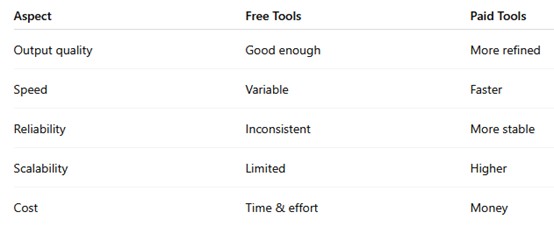
When you look at it this way, the decision becomes less about “better AI” and more about “better workflow.”
A Practical Way to Transition (Without Overpaying)
If you’re unsure whether to upgrade, don’t make a binary decision. Use a staged approach:
Stage 1: Free Exploration
Use only free tools. Focus on:
- learning prompt structure
- understanding limitations
- identifying real use cases
Stage 2: Friction Awareness
Pay attention to:
- repeated frustrations
- time wasted
- inconsistencies
Document where the tool slows you down.
Stage 3: Targeted Upgrade
Instead of upgrading everything, pay for one tool that solves your biggest bottleneck.
Not because it’s “better,” but because it removes friction where it matters most.
Stage 4: Re-evaluate Regularly
Your needs will change. What feels essential today might feel unnecessary in three months.
Avoid long-term commitment unless the value is clear and measurable.
The Deeper Insight Most People Miss
The real difference between free and paid AI tools is not capability. It’s alignment.
Free tools are designed for broad accessibility. Paid tools are designed for sustained use.
If your workflow is:
- occasional
- flexible
- low-risk
free tools are often enough.
If your workflow is:
- repetitive
- time-sensitive
- outcome-driven
paid tools start to make more sense.
But here’s the uncomfortable truth:
Many people pay for AI tools not because they need them, but because they expect the tool to compensate for unclear thinking, lack of structure, or weak processes.
No tool—free or paid—can fix that.
Final Thought: Don’t Outsource Judgment
AI tools, whether free or paid, are amplifiers. They amplify:
- your clarity
- your workflow design
- your decision-making
If those are weak, better tools won’t help much. If they’re strong, even free tools can take you surprisingly far.
So instead of asking:
“Is this tool worth paying for?”
A more useful question is:
“Where is my current workflow breaking, and would paying actually fix that?”
If you can answer that clearly, the decision becomes straightforward—and far less influenced by hype.
Recommend for you:
Different Types of AI Tools Explained (Text, Voice, Automation, Research)
Artificial Intelligence (AI) tools have significantly transformed how we work, communicate, and process data.
AI Tools for Content Creators With Limited Time
A practical, no-fluff guide for people who need results—not just inspiration
When AI Output Becomes a Cognitive Shortcut Problem
Psychologists have long studied heuristics—mental shortcuts that help us make decisions quickly.
The Learning Curve of AI Tools: Faster or Just Different?
AI tools are often described as “easy to use” or “intuitive,” and compared to traditional software, that is partly true.